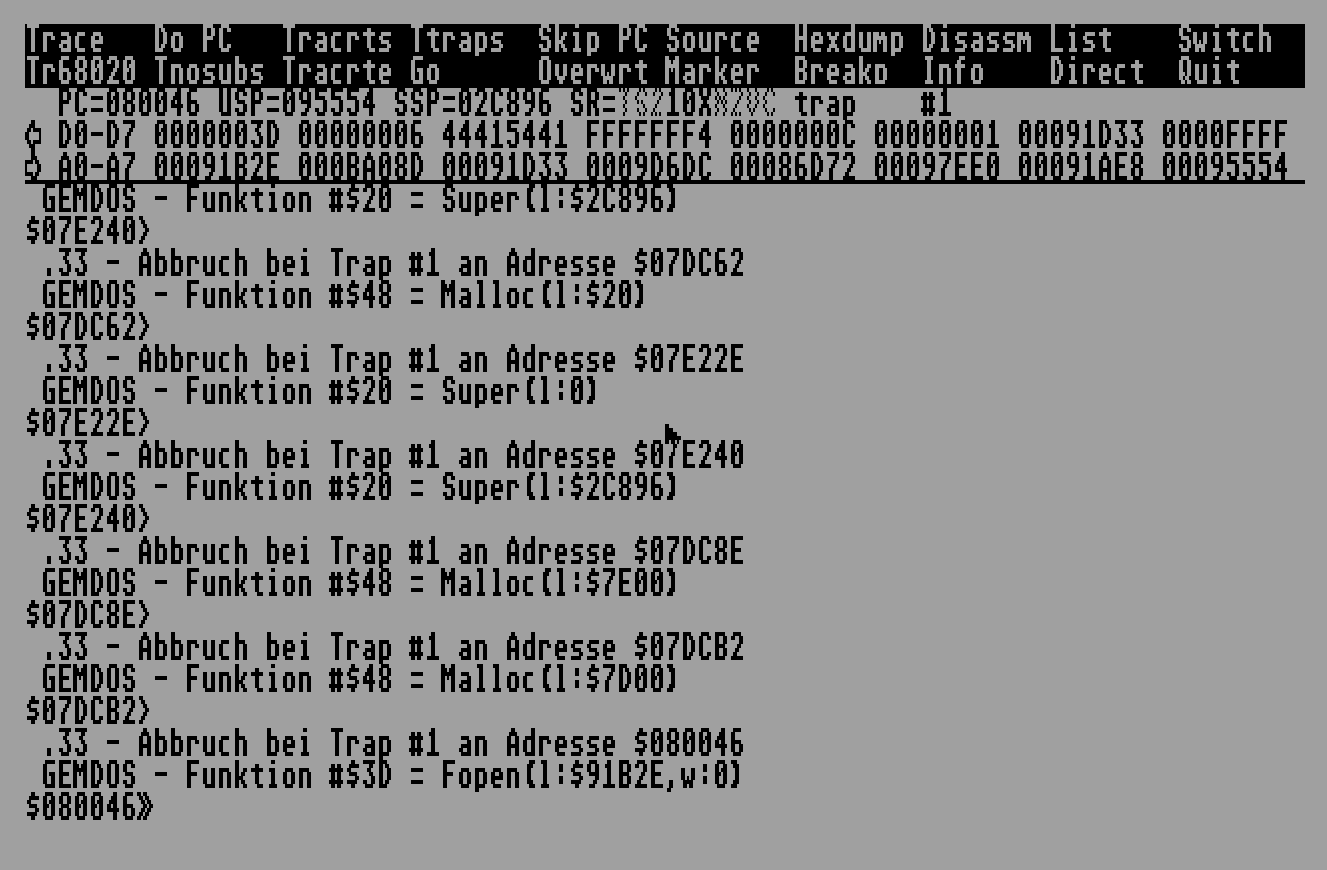
One thing worth mentioning is that in order to be effective, one has to learn the system as well as possible. In order to write demo effects (for example) it is usually sufficient to learn some parts of the hardware (Shifter/Videl, YM2149, MFP, etc). But other software are usually more complex and use other parts of the system, which includes I/O and the operating system itself.
Probably one of the most important things for this series is to learn how to get data from storage devices into memory. We will present some of the most used techniques in the hope of seeing them here will make them recognisable “out in the field”.
Table Of Contents
Literature
There’s only so much a small series like this can cover as far as the system is concerned. So, getting some books is recommended. Here are a few:
- The Atari Compendium, Scott Sanders
- Atari ST Internals, K. Gerits, L. Englisch, R. Bruckmann
- Atari Profibuch ST-STE-TT, Hans-Dieter Jankowski, Dietmar Rabisch, Julian F. Reschke
- Atari ST/STe/MSTe/TT/F030 Hardware Register Listing
Presented without any comments. Recommended to download a copy of each so they are easily accessible. Printed copies are even better.
Using the Operating System
GEMDOS Fopen(), Fread(), Fseek(), Fclose() etc
This is probably the most user friendly case. There are some files on the disk, we can see them from the GEM desktop (or not - they could be hidden), and our target program wants to read them. Here’s how a loading routine might look:
; a0=filename to load
; a6=address to load
ossom_loader:
                clr.w -(sp)                 ; Open for read only
                pea (a0)
                move.w #$3d,-(sp)           ; Fopen()
                trap #1                     ; call GEMDOS
                addq.l #8,sp
                move.w d0,d7                ; backup file handle

                ble load_fail

                pea (a6)                    ; address to load
                move.l #-1,-(sp)            ; maximum file length
                move.w d7,-(sp)             ; handle
                move.w #$3f,-(sp)           ; Fread()
                trap #1                     ; call GEMDOS
                lea 12(sp),sp

                tst.w d0
                ble load_fail

                move.w d7,-(sp)             ; handle
                move.w #$3e,-(sp)           ; Fclose()
                trap #1                     ; call GEMDOS
                addq.l #4,sp

                rts

load_fail:      move.w d0,$ffff8240.w               ; oops!
                move.w #$000,$ffff8240.w
                bra.s load_fail
A few comments on the above:
- Every time the OS is called, assume that some registers will be trashed. For early TOS it could be A0 and D0, for versions up to 2 it is A0/A1/D0/D1 and for versions 2 and above it is D0-D2/A0-A2.
- Compiled languages usually do not produce so straightforward code. Especially C compilers generatlly do not know what the
trapstatement is, it is not uncommon to see values pushed to the stack like above, but instead of thetrapinstruction absr XXXXis in its place. - The above is a very minimal routine. More sophisticated routines can use
Fseek()to query the file’s length after opening, or seek to a part of the file and not read all of it, or have more thorough error checking and handling (think multi disk games, if the file is not found then it’s not a catastrophic error, perhaps the wrong disk is inserted). And so many more variations.
In general though, the above code is indicative on what should be expected for files loaded using the system.
XBIOS Floprd()
If our target program doesn’t prefer using the OS’ file system services, it can still use slightly lower primitives to stream data into memory. As the headline says, Floprd() can be used for this purpose. Of course at that point the concept of “files” is something that the program defines. How the data is laid out in storage is not something one can assume, but instead must try and deduce.
Floprd()’s syntax looks like this
                move.w  #9,-(sp)        ; sector count
                move.w  #0,-(sp)        ; side
                move.w  #41,-(sp)       ; track (R.I.P. mOdmate :( )
                move.w  #0,-(sp)        ; start sector
                move.w  #0,-(sp)        ; device (0=first floppy drive)
                move.l  #0,-(sp)        ; reserved - set to 0
                pea     buf             ; address to read data to
                move.w  #8,-(sp)        ; Floprd()
                trap    #14             ; call XBIOS
                lea     20(sp),sp
This is a handy call as a full track from a disk’s side can be read at once.
Software that boot usually feature Floprd() as a “stage 2” loader, i.e. a small routine in the boot sector that loads the main code to be executed (assuming “stage 1” is the bootsector itself). Or, of course, they can simply use this system call throughout the lifetime of the program (it does require that the system VBL code is running, so this is not too common).
Low level primitives
Programming the FDC directly
Finally, there are programs who want to take matters into their own hands and use custom routines for all disk I/O. This is achieved by programming the WD1772 Floppy Disk Controller chip directly. The manual for this can be found in this site and is a recommended read (at least once). What it boils down to is that the CPU interfaces with the FDC via a few memory mapped registers, and there are 11 commands one can issue. Typically the ones used are RESTORE, SEEK, STEP-IN, STEP-OUT, RD SECTR.
No frills DMA loader
Here follows a routine written by Griff of Electronic Images that handles the loading of a “file” which is essentially written on disk starting at the first track, 2nd sector. Because the file is 13 sectors long, the routine will read 8 sectors from side 0 and then switch to side 1 to read the rest. In the case that the file was longer, the routine would issue a STEP-IN command to advance the drive head to the next track, etc.
The routine uses so-called “software delays”. When the floppy drive is working, it can take some indefinite time to finish executing a command. This could happen for any reason from “floppy head seeking” to “drive spinning up” to “a catastrophic error occurred”. Also, since the 68000 can issue commands to the FDC much faster that the FDC can read, a small pause is necessary between the sending of commands. Both these problems can be solved by just adding some loops that burn some cycles. In the following source fdcwait has a quite big software timeout for the execution of commands, and writefdc issues some delays for the writing of commands. It is typically fine to do this, but the probability of those routines working on faster machines is low. (This is not a diss on Griff or anyone by the way. If a piece of software is marked to work on specific machines, then it’s not an issue to use code that works only on those machines)
* Jose's intro:-Track 0,sector 2 and is 13 sectors long.
                BSR Dmaload

; ...

*************************************
* Fast DMA Load routine.            *
* By Griff December 1989.           *
* This loader doesnt use the WD1772 *
* read multiple sector command.     *
*************************************

sect_ptr        EQU 10

Dmaload         LEA $FFFF8606.W,A0
                LEA $FFFF8604.W,A1
                LEA $FFFFFA01.W,A2
                BSR seldrive
                BSR seektrack
                BSR read_sects
                RTS

* Select current drive/side
* d0 - 2 drive a
* d0 - 4 drive b

seldrive        MOVE $446.W,D0
                AND #1,D0
                ADDQ #1,D0
                ADD D0,D0
                OR side(PC),D0
                EOR.B #7,D0
select          MOVE.B #$E,$FFFF8800.W
                MOVE.B $FFFF8800.W,D1
                AND.B #$F8,D1
                OR.B D0,D1
                MOVE.B D1,$FFFF8802.W
                RTS

* Deselect current drive
* e.g turn motor off!

deselect        MOVE #$80,(A0)
                NOP
wait            BTST #7,(A1)
                BNE.S wait
                MOVEQ #7,D0
                BRA select

* Place read/write head on the
* track in 'track'.

seektrack       MOVE #$86,(A0)
                MOVE track(PC),D5
                BSR writefdc
                MOVE #$80,(A0)
                MOVEQ #16+4+3,D5
                BSR writefdc
                BSR fdcwait
                TST D5
                BNE seektrack
                RTS

* Read sectors into memory.

read_sects      LEA load_addr(PC),A3
                MOVE sect_no(PC),D3
                MOVEQ #sect_ptr,D4
                MOVE no_sects(PC),D7
read_lp         MOVE.L (A3),D5
                MOVE.B D5,$FFFF860D.W
                LSR.L #8,D5
                MOVE.B D5,$FFFF860B.W
                LSR.W #8,D5
                MOVE.B D5,$FFFF8609.W


                MOVE #$90,(A0)
                MOVE #$190,(A0)
                MOVE #$90,(A0)
                MOVEq #$01,d5
                BSR writefdc
                MOVE #$84,(A0)
                MOVE D3,d5
                BSR writefdc
                MOVE #$80,(A0)
                MOVE #$88,d5
                BSR writefdc
                BSR fdcwait
                TST D5
                BNE read_lp
                ADD.L #512,(A3)
                ADDQ #1,D3
                CMP D4,D3
                BGT.S step_in
                DBF D7,read_lp
                RTS
step_in MOVE #$80,(A0)
                MOVE #64+16+8+4+3,d5
                BSR writefdc                    ; lets step in!!
                BSR fdcwait                             ; wait for it...
                TST D5
                BNE step_in                             ; an error??
                MOVEQ #1,D3
                DBF D7,read_lp
                RTS

* Wait for FDC

fdcwait         MOVEQ #0,D5
                MOVE.L #$50000,D6
fdcwaitloop     BTST.B #5,(A2)
                BEQ.S wait_done
                SUBQ.L #1,D6
                BNE fdcwaitloop
                MOVEQ #-1,D5
wait_done       RTS

* Write d5 to fdc

writefdc        MOVE.L D6,-(SP)
                MOVE.W SR,-(SP)
                BSR waitf
                MOVE D5,(A1)
                BSR waitf
                MOVE.W (SP)+,SR
                MOVE.L (SP)+,D6
                RTS

waitf           MOVEQ #32,D6
waitflp DBF D6,waitflp
                RTS
Interrupt driven DMA loader
Again by Griff of Electronic Images comes a more sophisticated routine. This time the floppy disk interrupt vector $11c is utilised instead of busy loops to control the program flow. Therefore it can be more confusing for someone to understand what the code is doing (and more importantly, try to trace the code). $11c is used as a state machine, which means that the vector is changed depending what the routine is doing, so it can interrupt the next time something happens (for example, transition from RD SECTR to STEP-IN).
***************************************************************************
***************************************************************************
;                           The dma load code                             ;
***************************************************************************
***************************************************************************

Seekrate        EQU 3
Sectptr EQU 10

Do_load
                SF fin_load                             haven't finished yet
                MOVEQ #0,D1
                MOVE sectstoload(PC),D0                 no. sects to load
                MOVE sectoffset(PC),D1                  sector offset
                LEA file,A0                                     address
                DIVU #Sectptr,D1                                calc track offset
                MOVE D1,seektrack                               seek this track
                MOVE D1,currtrack
                SWAP D1                                 remainder+1 =
                ADDQ #1,D1                                      start sector within
                MOVE D1,sector                          sector.
                MOVE.L A0,pointer
                MOVE D0,no_sects                                sectors to go
                BSR setdiskint                          setup interrupts
                BSR seldrive                            select drive & side
                BSR do_seek                                     do the seek
wait_disk       TST.B fin_load
                BEQ.S wait_disk
                MOVE SR,-(SP)
                MOVE #$2700,SR
                BCLR #7,$FFFFFA09.W                     clear int enable for fdc int
                BCLR #7,$FFFFFA15.W                     clear int mask for fdc int
                BSET #5,$FFFFFA03.W                     unactive!
                MOVE.W (SP)+,SR
                SF loading
                RTS

* Setup mfp for disk interrupts.

setdiskint      MOVE.W SR,-(SP)
                MOVE #$2700,SR
                BCLR #5,$FFFFFA03.W                     active edge
                BSET #7,$FFFFFA09.W                     set int enable for fdc int
                BSET #7,$FFFFFA15.W                     set int mask for fdc int
                MOVE.L #read_rout,$11C.W
                MOVE.W (SP)+,SR
                RTS

* Send a seek command and track to seek to the floppy controller.

do_seek MOVE #$86,$FFFF8606.W
                MOVE seektrack(PC),D5
                BSR writefdc
                MOVE #$80,$FFFF8606.W
                MOVEQ #16+4+3,D5
                BSR writefdc
                RTS

read            MOVE.W D0,-(SP)
                MOVE.W #$80,$FFFF8606.W                 select status
                MOVE.W $FFFF8604.W,D0                   read status from last load
                BTST #3,D0
                BEQ.S okay1
                BRA.S loaderror
okay1           BTST #4,D0
                BEQ.S okay2
loaderror       ADDQ #1,no_sects
                SUB.L #512,pointer                      retry loading!
                SUBQ #1,sector
okay2           MOVE.W (SP)+,D0
                ADDQ #1,sector                          next sector
                CMP #Sectptr,sector                     new track?
                BGT.S stepin                            yes/no -
read_rout       MOVE.B pointer+3(PC),$FFFF860D.W        load sector
                MOVE.B pointer+2(PC),$FFFF860B.W        dma address count
                MOVE.B pointer+1(PC),$FFFF8609.W
                MOVE.W #$90,$FFFF8606.W
                MOVE.W #$190,$FFFF8606.W                fifo enable read
                MOVE.W #$90,$FFFF8606.W
                BSR fwait
                MOVE.W #1,$FFFF8604.W                   read 1 sector
                MOVE.W #$84,$FFFF8606.W
                BSR fwait
                MOVE.W sector(PC),$FFFF8604.W           say which sector
                MOVE.W #$80,$FFFF8606.W                 read it
                BSR fwait
                MOVE.W #$80,$FFFF8604.W
                ADD.L #512,pointer                      add to pointer
                SUBQ #1,no_sects                                decrement total sects
                BEQ.S INT_DONE                          to load.if done exit
                MOVE.L #read,$11C.W
                RTE

* Step in a track and then continue reading

stepin          MOVE #1,sector                          reset sector count
                ADDQ #1,currtrack                               next track
                MOVE.L #read_rout,$11C.W                continue reading
step            MOVE #$80,$FFFF8606.W                   send seek
                BSR fwait
                MOVE #64+16+8+4+3,$FFFF8604.W           command to controller
                RTE

INT_DONE        MOVE.L #INT_EXIT,$11C.W                 sectors loaded
                ST fin_load                                     set flag to say so
INT_EXIT        RTE

fwait           MOVE.L D0,-(SP)
                MOVEQ #19,D0
aw              DBF D0,aw
                MOVE.L (SP)+,D0
                RTS

* Write d5 to fdc

writefdc        MOVE.L D6,-(SP)
                MOVE.W SR,-(SP)
                BSR waitf
                MOVE D5,$FFFF8604.W
                BSR waitf
                MOVE.W (SP)+,SR
                MOVE.L (SP)+,D6
                RTS

waitf           MOVEQ #32,D6
waitflp DBF D6,waitflp
                RTS

* Select current drive/side

seldrive        MOVE.W $446.W,D0                                get bootdevice
                AND #1,D0                                       isolate first bit
                ADDQ #1,D0
                ADD D0,D0                                       calc right bit
                OR side(PC),D0
                EOR.B #7,D0
select          MOVE.B #$E,$FFFF8800.W                  select psg
                MOVE.B $FFFF8800.W,D1
                AND.B #$F8,D1
                OR.B D0,D1
                MOVE.B D1,$FFFF8802.W                   select drive/side
                RTS

seektrack       DS.W 1
currtrack       DS.W 1
pointer DS.L 1
no_sects        DS.W 1
sector  DS.W 1
fin_load        DS.W 1
Loading FAT12 files without GEMDOS
Some even more advanced routines can load GEMDOS files without calling the system at all. This is achieved by actually including code that is able to parse the FAT tables and read the file cluster-by-cluster. A possible reason for doing this is to make their life easier when it comes to laying the data on disk, but still be able to load the program in a low area in RAM (where the system would reside normally).
This is just mentioned here for completeness; there are plenty of examples out there for interested minds.
General tips
In general the I/O routines can be easily found when tracing through a program, as it is one of the first activities it is likely to do, especially with the more low level options.
Games will most likely have one routine to load data, and it will be fixed in RAM. Any part of the program wishing to load data off the disk will then call this routine with different parameters (anything from starting track/starting/side/starting sector/number of sectors in registers, to passing a data structure with all the info necessary). Therfore, locating the loading routine(s) and issuing a breakpoint on its (their) entry point(s) is a good way to skip a lot of tracing in order to get to the more interesting parts.
In a later installment (probably the next one) we will discuss on ways to getting data into files, but for now we can close with some usage tips on how to locate I/O routines easily.
Steem log/breakpoints
STEem engine features a handy list of built in breakpoints, one of them breaks when FDC interrupts happen. This is very handy to trace an interrupt driven FDC loader.
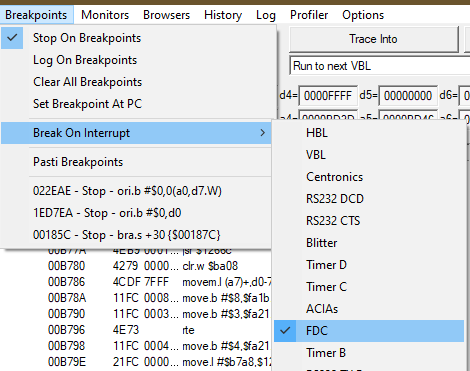
It also provides logging functions. These are different from breakpoints in the sense that when each of the events happen, it is logged to a file instead of stopping program execution. This can be more desirable if a lot of events stop execution.
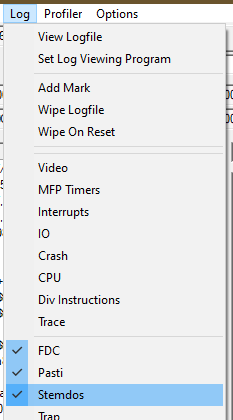
STEem FDC log
Here is an excerpt of the log while booting a game.
FDC: Seeking drive A to track 0 hbl_count=858020
FDC: Finished seeking to track 0 hbl_count=858029
FDC: Finished command, GPIP bit low.
FDC: 001140 - Setting FDC sector register to 1
FDC: 001158 - Set DMA sector count to 0
FDC: 001158 - Set DMA sector count to 1
FDC: 00116C - Set DMA address to 000B00
FDC: 001178 - executing command $80
FDC: Reading one sector from drive A track 0 side 0 sector 1 into address 000B00 dma_sector_count=1
FDC: Finished reading/writing sector 1 of track 0 of side 0
FDC: Finished read/write sector
FDC: Finished command, GPIP bit low.
FDC: 00117E - Reading status register as 10000000 ($80), clearing IRQ
FDC: 001126 - Setting FDC data register to 0
FDC: 001132 - executing command $13
FDC: Seeking drive A to track 0 hbl_count=858097
FDC: Finished seeking to track 0 hbl_count=858100
FDC: Finished command, GPIP bit low.
FDC: 001140 - Setting FDC sector register to 8
FDC: 001158 - Set DMA sector count to 0
FDC: 001158 - Set DMA sector count to 1
FDC: 00116C - Set DMA address to 000B00
FDC: 001178 - executing command $80
FDC: Reading one sector from drive A track 0 side 0 sector 8 into address 000B00 dma_sector_count=1
FDC: Finished reading/writing sector 8 of track 0 of side 0
FDC: Finished read/write sector
FDC: Finished command, GPIP bit low.
FDC: 00117E - Reading status register as 10000000 ($80), clearing IRQ
FDC: 001126 - Setting FDC data register to 3
FDC: 001132 - executing command $13
FDC: Seeking drive A to track 3 hbl_count=858171
FDC: Finished seeking to track 3 hbl_count=858180
FDC: Finished command, GPIP bit low.
FDC: 001140 - Setting FDC sector register to 6
FDC: 001158 - Set DMA sector count to 0
FDC: 001158 - Set DMA sector count to 1
FDC: 00116C - Set DMA address to 000B00
FDC: 001178 - executing command $80
FDC: Reading one sector from drive A track 3 side 1 sector 6 into address 000B00 dma_sector_count=1
FDC: Finished reading/writing sector 6 of track 3 of side 1
FDC: Finished read/write sector
FDC: Finished command, GPIP bit low.
FDC: 00117E - Reading status register as 10000000 ($80), clearing IRQ
FDC: 001126 - Setting FDC data register to 3
FDC: 001132 - executing command $13
FDC: Seeking drive A to track 3 hbl_count=858251
FDC: Finished seeking to track 3 hbl_count=858254
FDC: Finished command, GPIP bit low.
It is immediately apparent where the FDC routines are located, so opening a memory window around $1100 will reveal the routine (and save us a bit of time).
STEmdos
“STEmdos” is STEem’s mixed mode GEMDOS where the emulator can intercept GEMDOS calls and forward them to the host system, so it can emulate hard disks etc. An example log follows:
STEMDOS: SetBlock(0, $012476, 352698) called at address $0528C2
STEMDOS: Malloc(308) called at address $E108B2
STEMDOS: Malloc(-1) called at address $0528E8
STEMDOS: Malloc(150000) called at address $052908
STEMDOS: Malloc(32) called at address $050D24
STEMDOS: Malloc(32256) called at address $050D50
STEMDOS: Malloc(32000) called at address $050D74
STEMDOS: Intercepted Fopen
STEMDOS: Got filename as DATA001.DAT
STEMDOS: Leaving the call to GEMDOS
STEMDOS: Malloc(32000) called at address $050DF8
STEMDOS: Intercepted Fopen
STEMDOS: Got filename as DATA002.DAT
STEMDOS: Leaving the call to GEMDOS
STEMDOS: Malloc(32000) called at address $050E7C
STEMDOS: Intercepted Fopen
STEMDOS: Got filename as DATA003.DAT
STEMDOS: Leaving the call to GEMDOS
STEMDOS: Malloc(32000) called at address $050F00
STEMDOS: Intercepted Fopen
STEMDOS: Got filename as DATA004.DAT
STEMDOS: Leaving the call to GEMDOS
STEMDOS: Malloc(32000) called at address $050F84
STEMDOS: Intercepted Fopen
STEMDOS: Got filename as DATA005.DAT
STEMDOS: Leaving the call to GEMDOS
STEMDOS: Malloc(32000) called at address $051008
STEMDOS: Intercepted Fopen
STEMDOS: Got filename as DATA006.DAT
STEMDOS: Leaving the call to GEMDOS
STEMDOS: Intercepted FSfirst
STEMDOS: Got filename as SAVE.TXT
STEMDOS: Leaving the call to GEMDOS
Again, this makes locating of the location of the routines that call GEMDOS trivial.
Bugaboo OBSERVE
OBSERVE is a quite powerful command of the debugger. It allows for breaking execution before trap instructions are executed, along with printing the call parameters. It can be configured to break for all the functions of a specific trap or a subset of them. What follows is a screenshot of execution of a program with OBSERVE on, uncovering where in the program a Fopen call is triggered (amongst others).